examstrack logo

Which set of 2.4 GHz nonoverlapping wireless channels is standard in the United States?
What is a benefit for external users who consume public cloud resources?
Why does a switch flood a frame to all ports?
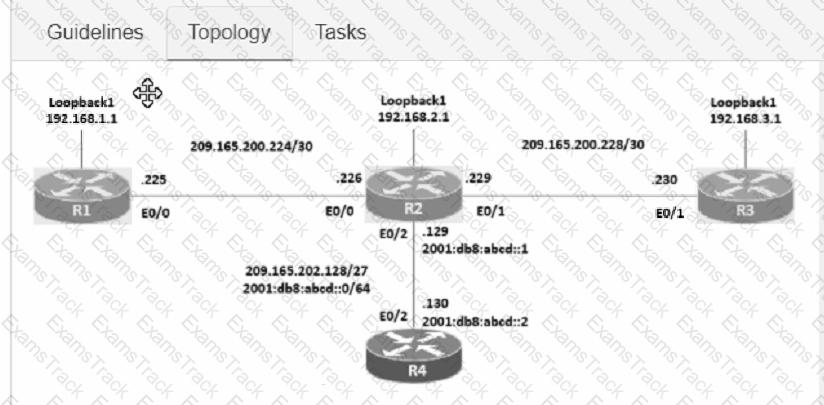
Connectivity between four routers has been established. IP connectivity must be configured in the order presented to complete the implementation. No dynamic routing protocols are included.
1. Configure static routing using host routes to establish connectivity from router R3 to the router R1 Loopback address using the source IP of 209.165.200.230.
2. Configure an IPv4 default route on router R2 destined for router R4.
3. Configure an IPv6 default router on router R2 destined for router R4.
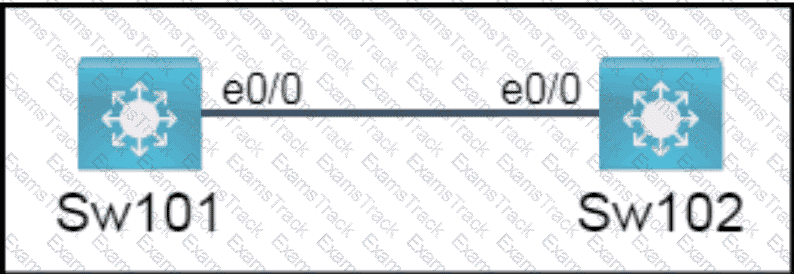
All physical cabling is in place. A company plans to deploy 32 new sites.
The sites will utilize both IPv4 and IPv6 networks.
1 . Subnet 172.25.0.0/16 to meet the subnet requirements and maximize
the number of hosts
Using the second subnet
• Assign the first usable IP address to e0/0 on Sw1O1
• Assign the last usable IP address to e0/0 on Sw102
2. Subnet to meet the subnet requirements and maximize
the number of hosts
c Using the second subnet
• Assign an IPv6 GUA using a unique 64-Bit interface identifier
on e0/0 on Sw101
• Assign an IPv6 GUA using a unique 64-Bit interface identifier
on eO/O on swi02
Guidelines
This is a lab item in which tasks will be performed on virtual devices.
• Refer to the Tasks tab to view the tasks for this lab item.
• Refer to the Topology tab to access the device console(s) and perform the tasks.
• Console access is available for all required devices by clicking the device icon or using
the tab(s) above the console window.
• All necessary preconfigurations have been applied.
• Do not change the enable password or hostname for any device.
• Save your configurations to NVRAM before moving to the next item.
• Click Next at the bottom of the screen to submit this lab and move to the next question.
• When Next is clicked, the lab closes and cannot be reopened.
Topology:
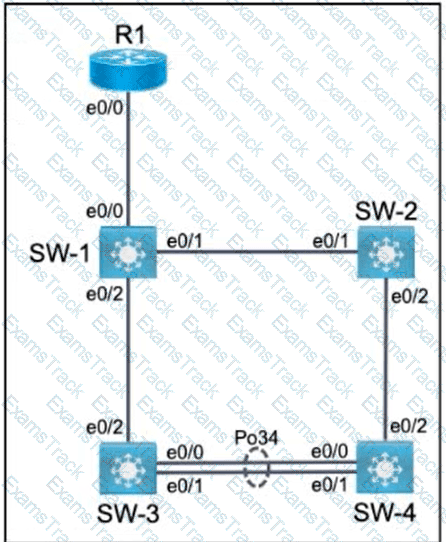
All relevant ports are preconfigured as IEEE 802.1Q trunks.
Task 1
Configure SW-1 port Ethernet0/0 to permit only VLANs 5 and 6.
Task 2
Configure ports Ethernet0/1 on SW-1 and SW-2 to use VLAN 77 as the native VLAN.
Task 3
Configure SW-2 port Ethernet0/2 to permit only VLAN 6.
Task 4
Using LACP, create a Port-Channel between SW-3 and SW-4.
Combine Ethernet0/0 and Ethernet0/1 into a Port-Channel while leaving the existing trunk configurations intact.
Assign Port-Channel number 34.
Only SW-3 must initiate LACP negotiations.
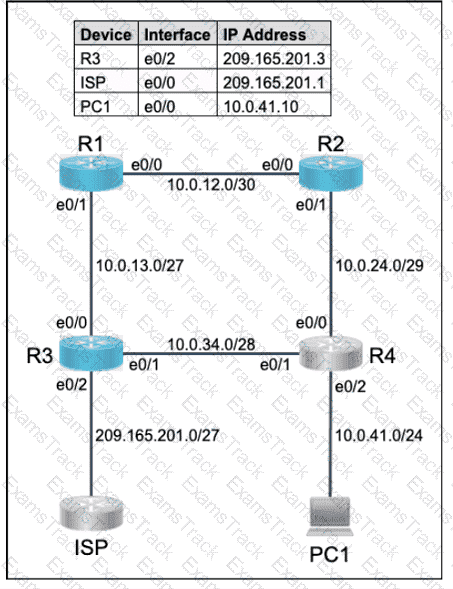
All physical cabling is in place. Router R4 and PCI are fully configured and
inaccessible. R4 ' s WAN interfaces use .4 in the last octet for each subnet.
Configurations should ensure that connectivity is established end-to-end.
1 . Configure static routing to ensure RI prefers the path through R2 to
reach only PCI on R4 ' s LAN
2. Configure static routing that ensures traffic sourced from RI will take
an alternate path through R3 to PCI in the event of an outage along
the primary path
3. Configure default routes on RI and R3 to the Internet using the least number of hops
Guidelines
This is a lab item in which tasks will be performed on virtual devices.
• Refer to the Tasks tab to view the tasks for this lab item.
• Refer to the Topology tab to access the device console(s) and perform the tasks.
• Console access is available for all required devices by clicking the device icon or using
the tab(s) above the console window.
• All necessary preconfigurations have been applied.
• Do not change the enable password or hostname for any device.
• Save your configurations to NVRAM before moving to the next item.
• Click Next at the bottom of the screen to submit this lab and move to the next question.
• When Next is clicked, the lab closes and cannot be reopened.
Topology:
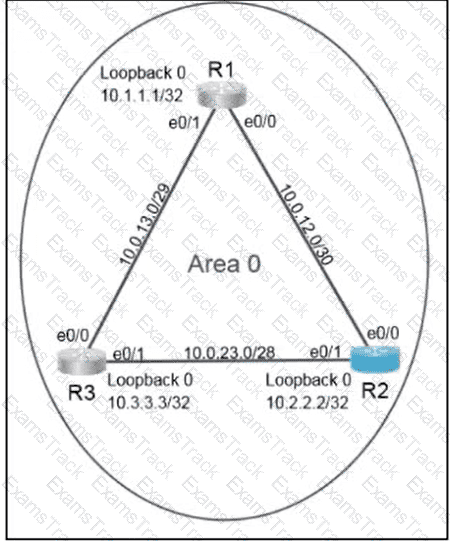
Configure OSPF routing for the network by completing the following tasks:
Task 1
Configure OSPF on R2. Ensure that R1 and R3 become neighbors.
Use process ID 30.
Use 10.22.22.22 as the router ID.
Under the OSPF process, advertise the following specific prefixes:
10.0.23.0/28
10.0.12.0/30
Task 2
Ensure that R2 always becomes the designated router (DR).
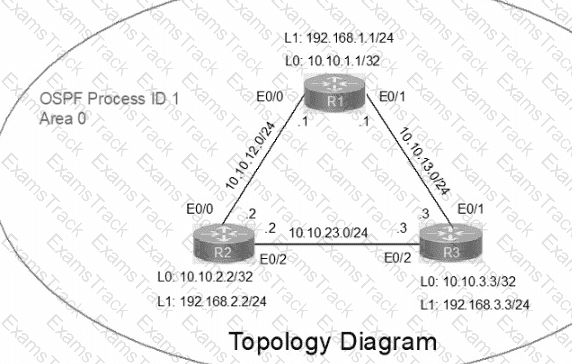
IP connectivity between the three routers is configured. OSPF adjacencies must be established.
1. Configure R1 and R2 Router IDs using the interface IP addresses from the link that is shared between them.
2. Configure the R2 links with a max value facing R1 and R3. R2 must become the DR. R1 and R3 links facing R2 must remain with the default OSPF configuration for DR election. Verify the configuration after clearing the OSPF process.
3. Using a host wildcard mask, configure all three routers to advertise their respective Loopback1 networks.
4. Configure the link between R1 and R3 to disable their ability to add other OSPF routers.
Physical connectivity is implemented between the two Layer 2 switches,
and the network connectivity between them must be configured.
I . Configure an LACP EtherChanneI and number it as 44; configure it
between switches SWI and SW2 using interfaces EthernetO/O and
Ethernet0/1 on both sides. The LACP mode must match on both ends.
2. Configure the EtherChanneI as a trunk link.
3. Configure the trunk link with 802. Iq tags.
4. Configure VLAN ' MONITORING ' as the untagged VLAN of the
EtherChannel.
==================
Guidelines
This is a lab item in which tasks will be performed on virtual devices.
• Refer to the Tasks tab to view the tasks for this lab item.
• Refer to the Topology tab to access the device console(s) and perform the tasks.
• Console access is available for all required devices by clicking the device icon or using
the tab(s) above the console window.
• All necessary preconfigurations have been applied.
• Do not change the enable password or hostname for any device.
• Save your configurations to NVRAM before moving to the next item.
• Click Next at the bottom of the screen to submit this lab and move to the next question.
• When Next is clicked, the lab closes and cannot be reopened.
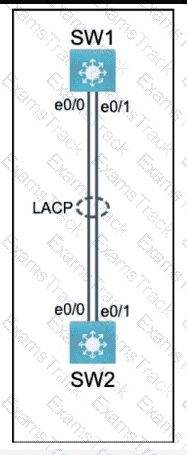
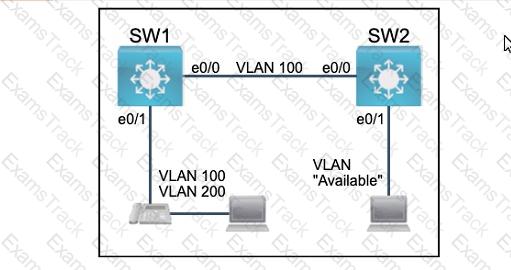
All physical cabling between the two switches is installed. Configure the network connectivity between the switches using the designated VLANs and interfaces.
1. Configure VLAN 100 named Compute and VLAN 200 named Telephony where required for each task.
2. Configure Ethernet0/1 on SW2 to use the existing VLAN named Available.
3. Configure the connection between the switches using access ports.
4. Configure Ethernet0/1 on SW1 using data and voice VLANs.
5. Configure Ethemet0/1 on SW2 so that the Cisco proprietary neighbor discovery protocol is turned off for the designated interface only.
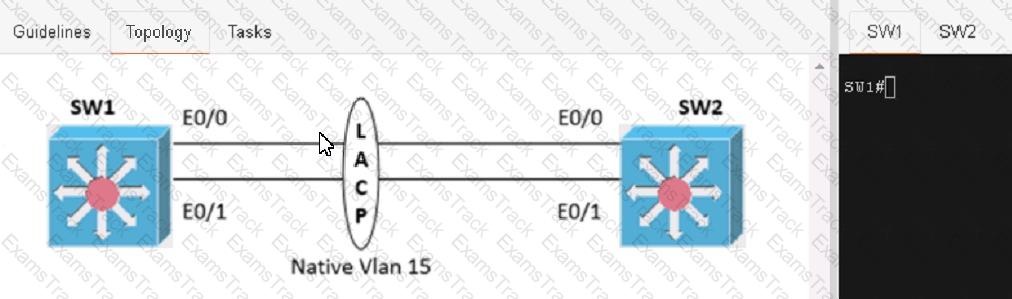
Physical connectivity is implemented between the two Layer 2 switches, and the network connectivity between them must be configured
1. Configure an LACP EtherChannel and number it as 1; configure it between switches SW1 and SVV2 using interfaces Ethernet0/0 and Ethernet0/1 on both sides. The LACP mode must match on both ends
2 Configure the EtherChannel as a trunk link.
3. Configure the trunk link with 802.1 q tags.
4. Configure the native VLAN of the EtherChannel as VLAN 15.
The clients and DHCP server reside on different subnets. Which command must be used to forward requests and replies between clients on the 10.10.0.1/24 subnet and the DHCP server at 192.168.10.1?
Refer to the exhibit.
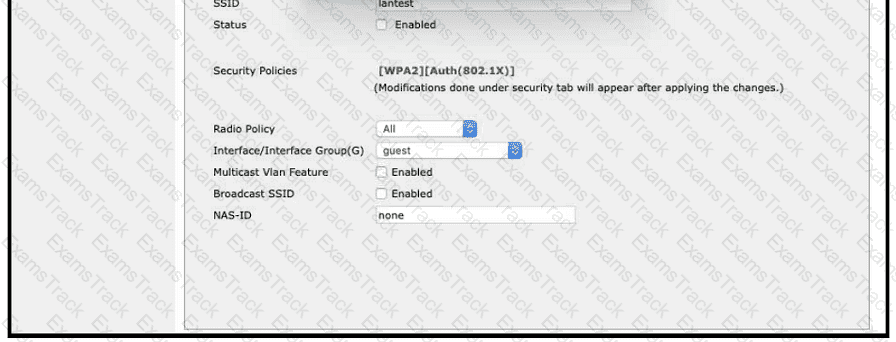
A Cisco engineer creates a new WLAN called lantest. Which two actions must be performed so that only high-speed 2.4-GHz clients connect? (Choose two.)
Refer to the exhibit.
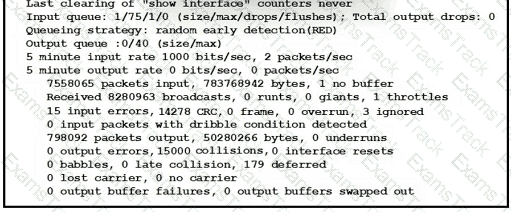
An administrator received a call from a branch office regarding poor application performance hosted at the headquarters. Ethernet 1 is connected between Router1 and the LAN switch. What identifies the issue?
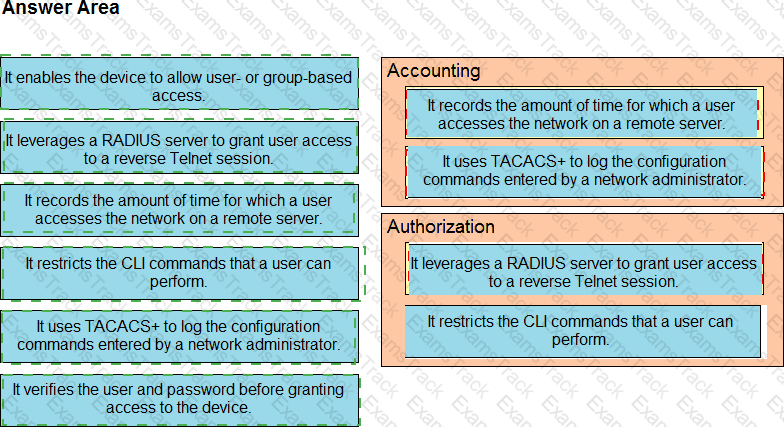
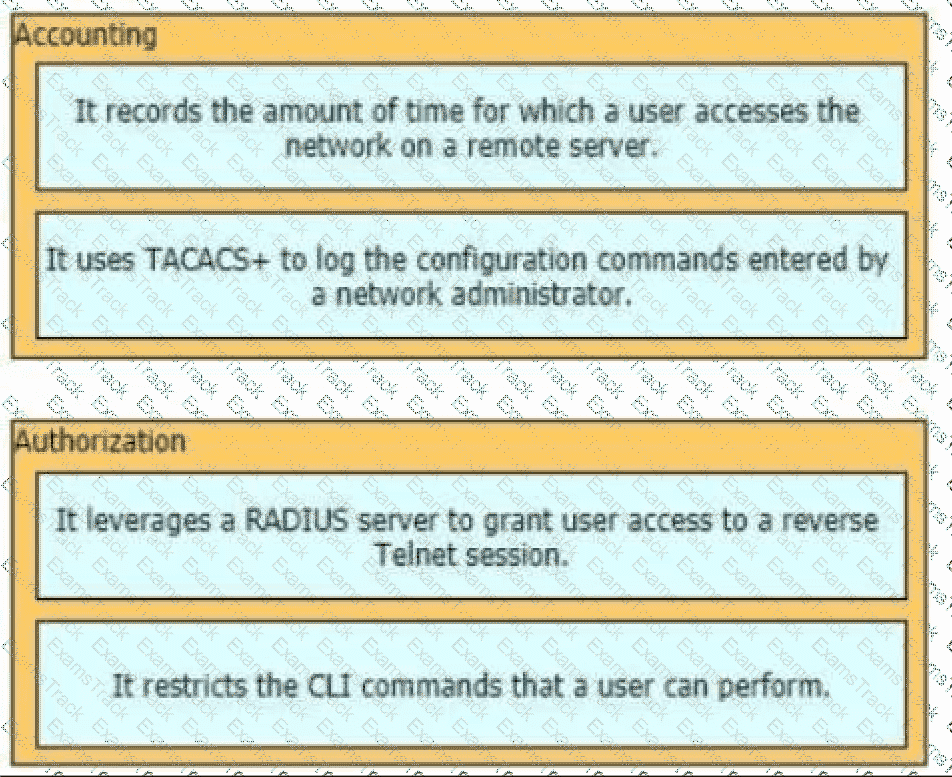
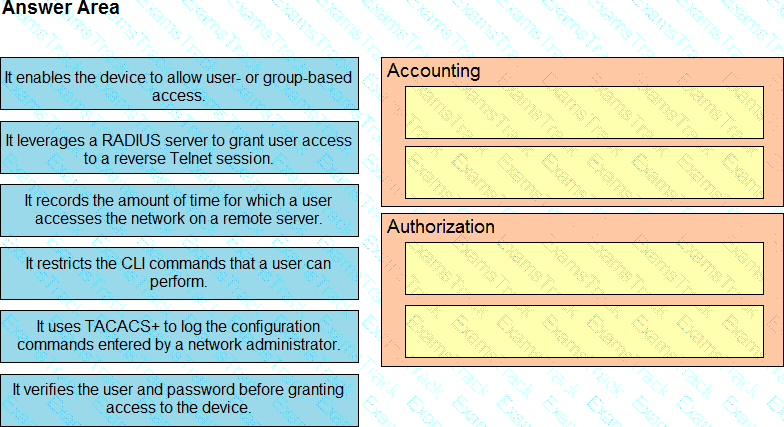
Drag and drop the AAA features from the left onto the corresponding AAA security services on the right. Not all options are used.
What is the function of northbound API?
What is a similarity between 1000BASE-LX and 1000BASE-T standards?
What is a function of a Next-Generation IPS?
Which characteristic differentiates the concept of authentication from authorization and accounting?
|
PDF + Testing Engine
|
|---|
|
$52.5 |
|
Testing Engine
|
|---|
|
$40.5 |
|
PDF (Q&A)
|
|---|
|
$34.5 |
Cisco Free Exams |
|---|

|

Copyright © 2026 Examstrack. All Rights Reserved

TESTED 06 Oct 2026