Summer Sale Limited Time 70% Discount Offer - Ends in 0d 00h 00m 00s - Coupon code: 70track

Free Microsoft MS-102 Practice Exam with Questions & Answers

Questions 1

You have a Microsoft 365 E5 subscription. You are implementing Microsoft Defender for Cloud Apps. You need to ensure that you can create OAuth app policies.

Solution: You add an API token to Defender for Cloud Apps.

Does this meet the goal?

Options:
A.

Yes

B.

No

Microsoft MS-102 Premium Access
Questions 2

You need to configure Office on the web to meet the technical requirements.

What should you do?

Options:
A.

Assign the Global reader role to User1.

B.

Enable sensitivity labels for Office files in SharePoint Online and OneDrive.

C.

Configure an auto-labeling policy to apply the sensitivity labels.

D.

Assign the Office apps admin role to User1.

Questions 3

Note: This question is part of a series of questions that present the same scenario. Each question in the series contains a unique solution that might meet the stated goals. Some question sets might have more than one correct solution, while others might not have a correct solution.

After you answer a question in this section, you will NOT be able to return to it. As a result, these questions will not appear in the review screen.

Your network contains an Active Directory domain named contoso.com that is synced to Microsoft Microsoft Entra ID (Microsoft Entra ID).

You manage Windows 10 devices by using Microsoft System Center Configuration Manager (Current Branch).

You configure a pilot for co-management.

You add a new device named Device1 to the domain. You install the Configuration Manager client on Device1.

You need to ensure that you can manage Device1 by using Microsoft Intune and Configuration Manager.

Solution: You create a device configuration profile from the Device Management admin center.

Does this meet the goal?

Options:
A.

Yes

B.

No

Questions 4

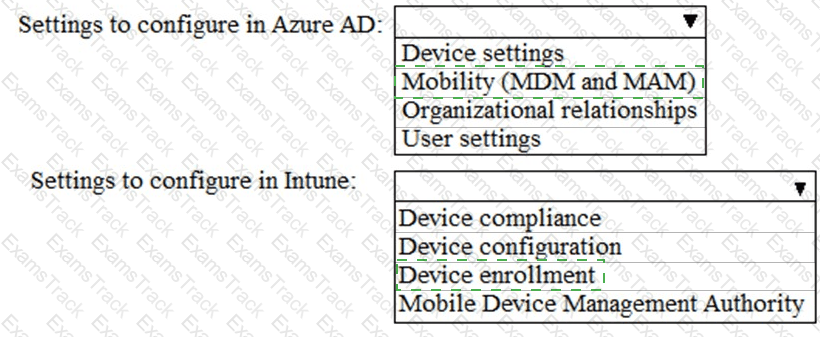
You need to meet the technical requirements and planned changes for Intune.

What should you do? To answer, select the appropriate options in the answer area.

NOTE: Each correct selection is worth one point.
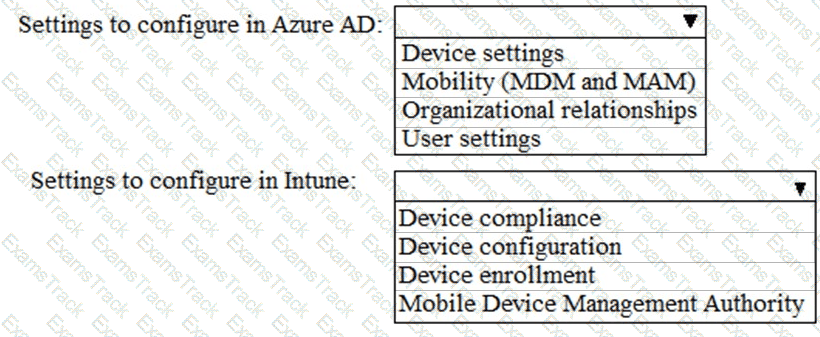
MS-102 Question 4

Options:
Questions 5

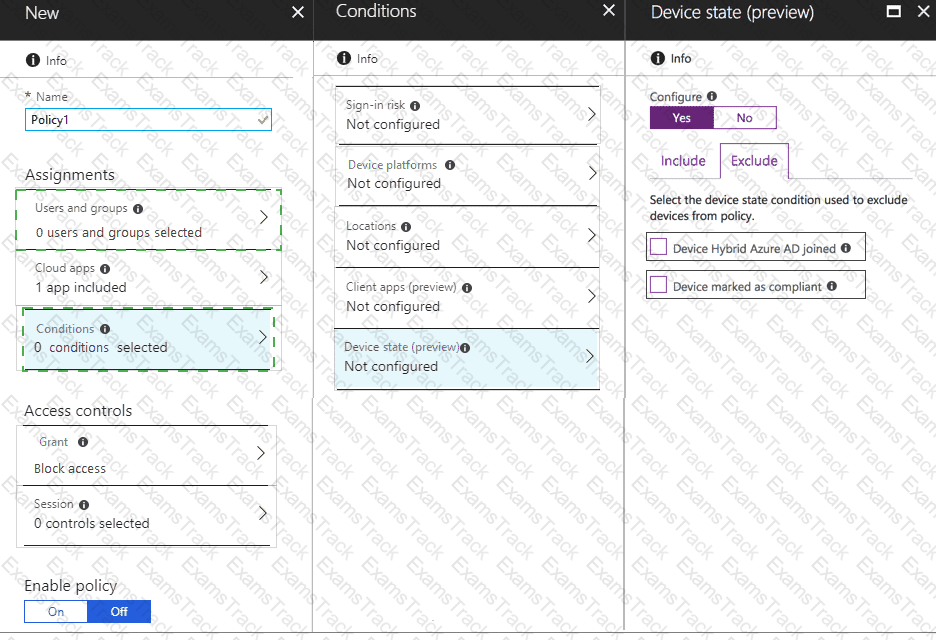
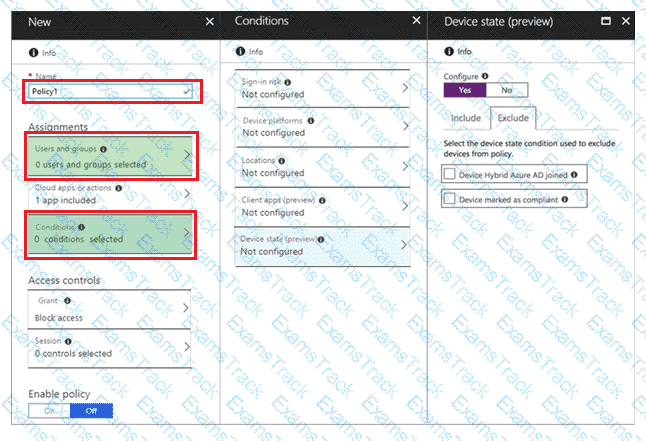
You need to meet the Intune requirements for the Windows 10 devices.

What should you do? To answer, select the appropriate options in the answer area.

NOTE: Each correct selection is worth one point.
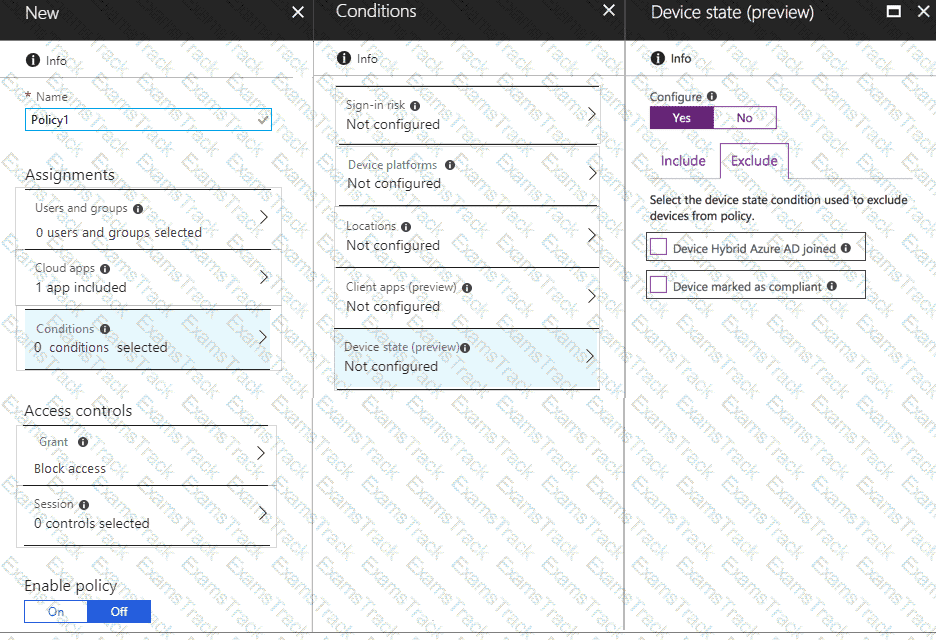
MS-102 Question 5

Options:
Questions 6

Note: This question is part of a series of questions that present the same scenario. Each question in the series contains a unique solution that might meet the stated goals. Some question sets might have more than one correct solution, while others might not have a correct solution.

After you answer a question in this section, you will NOT be able to return to it. As a result, these questions will not appear in the review screen.

Your network contains an Active Directory domain named contoso.com that is synced to Microsoft Microsoft Entra ID (Microsoft Entra ID).

You manage Windows 10 devices by using Microsoft System Center Configuration Manager (Current Branch).

You configure a pilot for co-management.

You add a new device named Device1 to the domain. You install the Configuration Manager client on Device1.

You need to ensure that you can manage Device1 by using Microsoft Intune and Configuration Manager.

Solution: Define a Configuration Manager device collection as the pilot collection. Add Device1 to the collection.

Does this meet the goal?

Options:
A.

Yes

B.

NO

Questions 7

You need to create the Microsoft Store for Business. Which user can create the store?

Options:
A.

User2

B.

User3

C.

User4

D.

User5

Questions 8

You need to ensure that the support technicians can meet the technical requirement for the Montreal office mobile devices.

What is the minimum of dedicated support technicians required?

Options:
A.

1

B.

4

C.

7

D.

31

Questions 9

You need to configure the compliance settings to meet the technical requirements.

What should you do in the Microsoft Endpoint Manager admin center?

Options:
A.

From Compliance policies, modify the Notifications settings.

B.

From Locations, create a new location for noncompliant devices.

C.

From Retire Noncompliant Devices, select Clear All Devices Retire State.

D.

Modify the Compliance policy settings.

Questions 10

You need to ensure that User1 can enroll the devices to meet the technical requirements. What should you do?

Options:
A.

From the Microsoft Entra ID admin center, assign User1 the Cloud device administrator rote.

B.

From the Microsoft Entra ID admin center, configure the Maximum number of devices per user setting.

C.

From the Intune admin center, add User1 as a device enrollment manager.

D.

From the Intune admin center, configure the Enrollment restrictions.