examstrack logo

How can the Snowpipe REST API be used to keep a log of data load history?
Call insertReport every 20 minutes, fetching the last 10,000 entries.
Call loadHistoryScan every minute for the maximum time range.
Call insertReport every 8 minutes for a 10-minute time range.
Call loadHistoryScan every 10 minutes for a 15-minute time range.
Snowpipe is a service that automates and optimizes the loading of data from external stages into Snowflake tables. Snowpipe uses a queue to ingest files as they become available in the stage. Snowpipe also provides REST endpoints to load data and retrieve load history reports1.
The loadHistoryScan endpoint returns the history of files that have been ingested by Snowpipe within a specified time range. The endpoint accepts the following parameters2:
pipe: The fully-qualified name of the pipe to query.
startTimeInclusive: The start of the time range to query, in ISO 8601 format. The value must be within the past 14 days.
endTimeExclusive: The end of the time range to query, in ISO 8601 format. The value must be later than the start time and within the past 14 days.
recentFirst: A boolean flag that indicates whether to return the most recent files first or last. The default value is false, which means the oldest files are returned first.
showSkippedFiles: A boolean flag that indicates whether to include files that were skipped by Snowpipe in the response. The default value is false, which means only files that were loaded are returned.
The loadHistoryScan endpoint can be used to keep a log of data load history by calling it periodically with a suitable time range. The best option among the choices is D, which is to call loadHistoryScan every 10 minutes for a 15-minute time range. This option ensures that the endpoint is called frequently enough to capture the latest files that have been ingested, and that the time range is wide enough to avoid missing any files that may have been delayed or retried by Snowpipe. The other options are either too infrequent, too narrow, or use the wrong endpoint3.
1: Introduction to Snowpipe | Snowflake Documentation
2: loadHistoryScan | Snowflake Documentation
3: Monitoring Snowpipe Load History | Snowflake Documentation
A company is trying to Ingest 10 TB of CSV data into a Snowflake table using Snowpipe as part of Its migration from a legacy database platform. The records need to be ingested in the MOST performant and cost-effective way.
How can these requirements be met?
Use ON_ERROR = continue in the copy into command.
Use purge = TRUE in the copy into command.
Use FURGE = FALSE in the copy into command.
Use on error = SKIP_FILE in the copy into command.
For ingesting a large volume of CSV data into Snowflake using Snowpipe, especially for a substantial amount like 10 TB, theon error = SKIP_FILEoption in theCOPY INTOcommand can be highly effective. This approach allows Snowpipe to skip over files that cause errors during the ingestion process, thereby not halting or significantly slowing down the overall data load. It helps in maintaining performance and cost-effectiveness by avoiding the reprocessing of problematic files and continuing with the ingestion of other data.
Consider the following COPY command which is loading data with CSV format into a Snowflake table from an internal stage through a data transformation query.
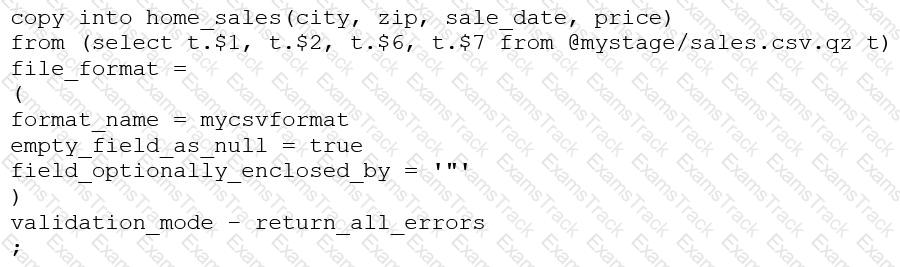
This command results in the following error:
SQL compilation error: invalid parameter 'validation_mode'
Assuming the syntax is correct, what is the cause of this error?
The VALIDATION_MODE parameter supports COPY statements that load data from external stages only.
The VALIDATION_MODE parameter does not support COPY statements with CSV file formats.
The VALIDATION_MODE parameter does not support COPY statements that transform data during a load.
The value return_all_errors of the option VALIDATION_MODE is causing a compilation error.
The VALIDATION_MODE parameter is used to specify the behavior of the COPY statement when loading data into a table. It is used to specify whether the COPY statement should return an error if any of the rows in the file are invalid or if it should continue loading the valid rows. The VALIDATION_MODE parameter is only supported for COPY statements that load data from external stages1.
The query in the question uses a data transformation query to load data from an internal stage. A data transformation query is a query that transforms the data during the load process, such as parsing JSON or XML data, applying functions, or joining with other tables2.
According to the documentation, VALIDATION_MODE does not support COPY statements that transform data during a load. If the parameter is specified, the COPY statement returns an error1. Therefore, option C is the correct answer.
COPY INTO
|
PDF + Testing Engine
|
|---|
|
$49.5 |
|
Testing Engine
|
|---|
|
$37.5 |
|
PDF (Q&A)
|
|---|
|
$31.5 |
Snowflake Free Exams |
|---|

|

Copyright © 2026 Examstrack. All Rights Reserved

TESTED 05 Oct 2026