examstrack logo

You have an Azure subscription that is linked to a Microsoft Entra tenant.
From the Azure portal, you register an enterprise application.
Which additional resource will be created in Microsoft Entra ID? sc new
You need to implement the planned change for VM1 to access storage1. The solution must meet the technical requirements.
What should you do first?
You need to implement the function apps to meet the technical requirements.
Which apps should you include in the implementation?
You need to implement the planned change for WAF1. The solution must minimize administrative effort.
What should you do?
You need to delegate a user to implement the planned change for Defender for Cloud. The solution must follow the principle of least privilege.
Which user should you choose?
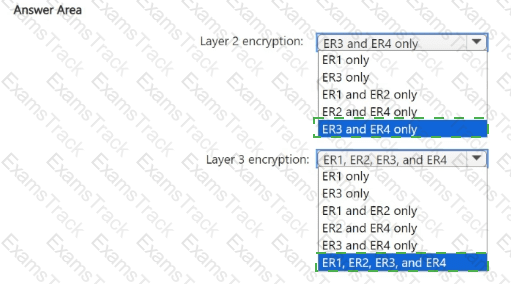
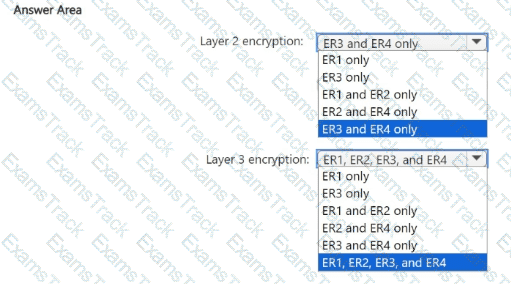
You need to recommend an encryption solution for the planned ExpressRoute implementation. The solution must meet the technical requirements.
Which ExpressRoute circuit should you recommend for each type of encryption? To answer, select the appropriate options in the answer area.
NOTE: Each correct selection is worth one point.
Lab Task
use the following login credentials as needed:
To enter your username, place your cursor in the Sign in box and click on the username below.
To enter your password. place your cursor in the Enter password box and click on the password below.
Azure Username: Userl -28681041@ExamUsers.com
Azure Password: GpOAe4@lDg
If the Azure portal does not load successfully in the browser, press CTRL-K to reload the portal in a new browser tab.
The following information is for technical support purposes only:
Lab Instance: 28681041
Task 5
You need to ensure that only devices connected to a 131-107.0.0/16 subnet can access data in the rg1lod28681041 Azure Storage account.
Lab Task
use the following login credentials as needed:
To enter your username, place your cursor in the Sign in box and click on the username below.
To enter your password. place your cursor in the Enter password box and click on the password below.
Azure Username: Userl -28681041@ExamUsers.com
Azure Password: GpOAe4@lDg
If the Azure portal does not load successfully in the browser, press CTRL-K to reload the portal in a new browser tab.
The following information is for technical support purposes only:
Lab Instance: 28681041
Task 9
You need to ensure that the rg1lod28681041n1 Azure Storage account is encrypted by using a key stored in the KeyVault28681041 Azure key vault.
Lab Task
use the following login credentials as needed:
To enter your username, place your cursor in the Sign in box and click on the username below.
To enter your password. place your cursor in the Enter password box and click on the password below.
Azure Username: Userl -28681041@ExamUsers.com
Azure Password: GpOAe4@lDg
If the Azure portal does not load successfully in the browser, press CTRL-K to reload the portal in a new browser tab.
The following information is for technical support purposes only:
Lab Instance: 28681041
Task 4
You need to ensure that a user named user2-28681041 can manage the properties of the virtual machines in the RG1lod28681041 resource group. The solution must use the principle of least privilege.
Lab Task
use the following login credentials as needed:
To enter your username, place your cursor in the Sign in box and click on the username below.
To enter your password. place your cursor in the Enter password box and click on the password below.
Azure Username: Userl -28681041@ExamUsers.com
Azure Password: GpOAe4@lDg
If the Azure portal does not load successfully in the browser, press CTRL-K to reload the portal in a new browser tab.
The following information is for technical support purposes only:
Lab Instance: 28681041
Task 3
The developers at your company plan to create a web app named App28681041 and to publish the app to https://www.contoso.com. You need to perform the following tasks:
• Ensure that App28681041 is registered to Azure AD.
• Generate a password for App28681041.
|
PDF + Testing Engine
|
|---|
|
$45 |
|
Testing Engine
|
|---|
|
$35 |
|
PDF (Q&A)
|
|---|
|
$30 |
Microsoft Free Exams |
|---|
|

Copyright © 2026 Examstrack. All Rights Reserved

TESTED 03 Nov 2026