examstrack logo

Your company uses Teams.
You plan to assign an enhanced encryption policy to enable end-to-end encryption for Teams calls.
Which features support end-to-end encryption for one-to-one Teams calls?
Note: This question is part of a series of questions that present the same scenario. Each question in the series contains a unique solution that might meet the stated goals. Some question sets might have more than one correct solution, while others might not have a correct solution.
After you answer a question in this section, you will NOT be able to return to it. As a result, these questions will not appear in the review screen.
You company has a Microsoft 365 subscription and a Virtual Desktop Infrastructure (VDI) solution.
The company’s Microsoft Teams upgrade policy is set to Teams only coexistence mode.
You deploy the Microsoft Installer (MSI) package for Microsoft Teams to the VDI solution.
Several months later, users of the VDI solution report that their workstation is missing several new Microsoft Teams features.
You need to ensure that the VDI solution users can use the new Microsoft Teams features.
Solution: You run the Get-WUInstall cmdlet and specify the -AcceptAll parameter.
Does this meet the goal?
You have a Microsoft 365 subscription.
You plan to implement Microsoft Teams.
You need to perform network quality and connectivity tests from an on-premises network to Microsoft 365 Online services by using the Network Testing Companion
You install the Network Testing Companion module on a local Windows 10 device.
Which additional software should you install to perform the tests?
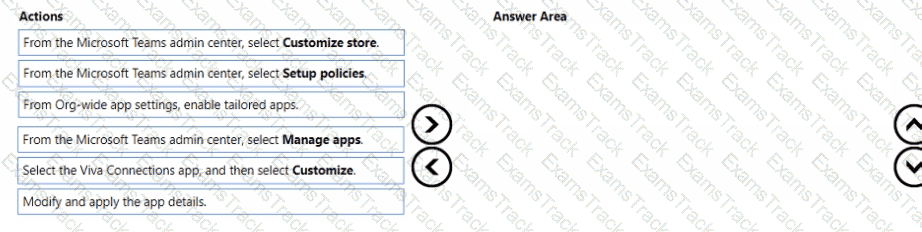
You need to implement the planned changes for Viva Connections.
Which three actions should you perform in sequence? To answer, move the appropriate actions from the list of actions to the answer area and arrange them in the correct order.
Your company uses Teams.
You plan to deploy Teams to a branch office that has limited bandwidth.
Which Two features can he used when the Teams client has a bandwidth restriction of 150 kilobit/s up and 150 kilobit/s down? Each correct answer presents a complete solution.
NOTE: Each correct selection is worth one point.
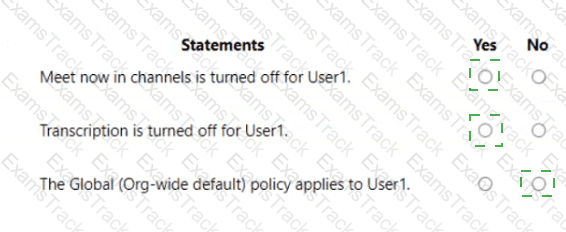
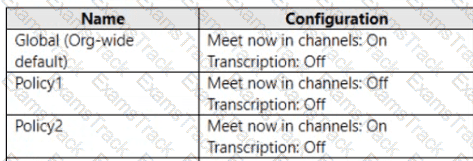
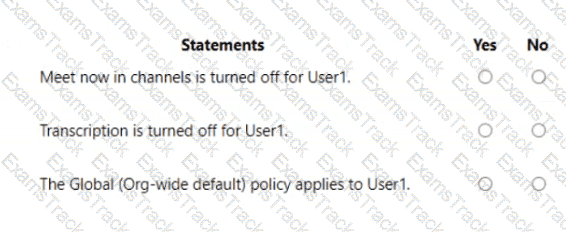
You have a Microsoft 365 subscription that uses Microsoft Teams and contains a user named User1 and three groups named Group1 , Group2 and Group3. User1 is a member of Group1, Group2, and Group3.
The subscription has the meeting policies shown in the following table.
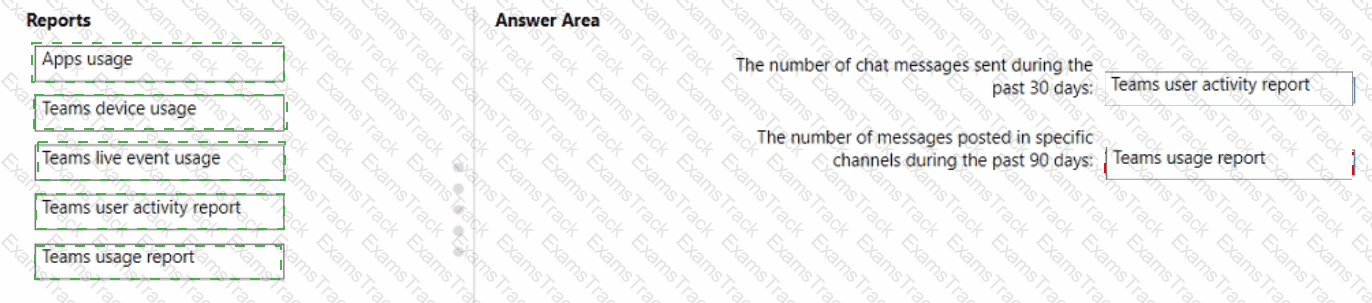
You have a Microsoft 365 subscription that uses Microsoft Teams.
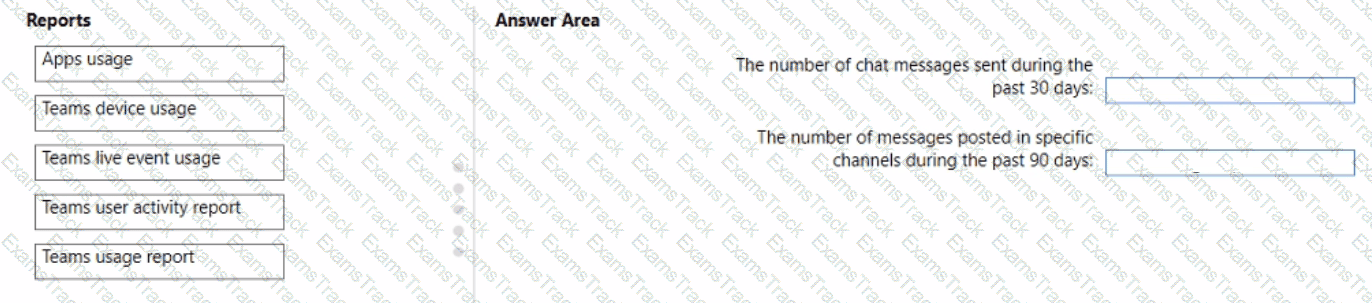
You need to identify the following information:
• The number of chat messages sent during the past 30 days
• The number of messages posted in specific channels during the past 90 days
Which reports should use? To answer, drag the appropriate reports to the correct pieces of information. Each report may be used once, more than once, or not at all. You may need to drag the split bar between panes or scroll to view content.
NOTE: Each correct selection is worth one point
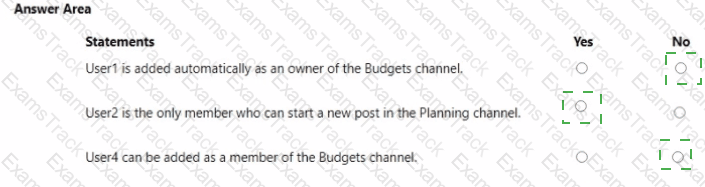
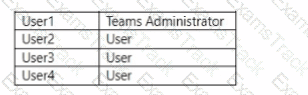
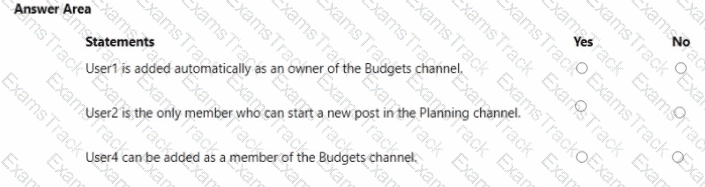
You have a Microsoft 365 subscription that uses Teams and contains the users shown in the following table.
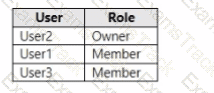
You have a private team named Sales that contains the members shown in the following table.
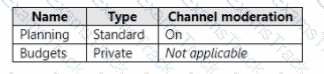
The Sales team contains the channels shown in the following table.
For each of the following statements, select Yes if the statement is true. Otherwise, select No.
NOTE: Each correct selection is worth one point.
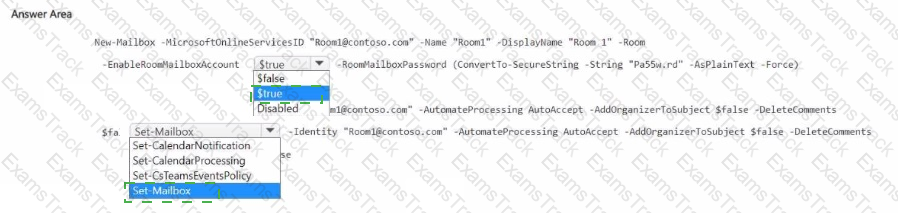
You have a Microsoft 365 E5 subscription.
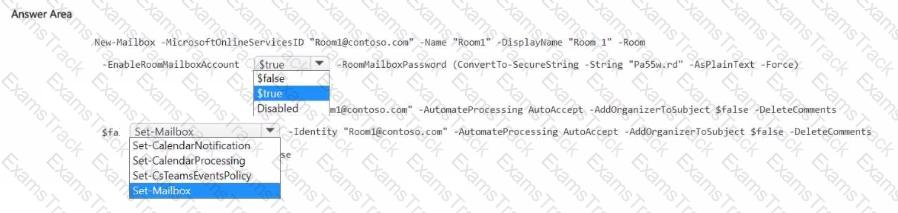
You purchase a new Teams Rooms device.
You need to create a Microsoft 365 resource account named Room1 for the device. The solution must ensure that Room1 automatically accepts meeting invitations.
How should you complete the PowerShell command? To answer, select the appropriate options in the answer area.
NOTE: Each correct selection is worth one point.
Your company uses Teams.
All users are assigned a Microsoft 365 E? license.
You need to purchase add-on licenses that will enable the following features for the Teams environment
Microsoft Purview Information Barriers
Data loss prevention (DIP) for Teams chat and channel messages
Safe attachments for Microsoft SharePoint OneDrive and Teams
To answer, drag the appropriate reports to the correct requirements. Each report may be used once, more than once, or not at all.

|
PDF + Testing Engine
|
|---|
|
$43.75 |
|
Testing Engine
|
|---|
|
$33.75 |
|
PDF (Q&A)
|
|---|
|
$28.75 |
Microsoft Free Exams |
|---|

|

Copyright © 2026 Examstrack. All Rights Reserved

TESTED 05 Oct 2026