examstrack logo

You have a Microsoft 365 subscription and use the Microsoft Intune Suite. You have the devices shown in the following table.
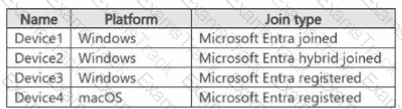
All the devices are enrolled in Intune.
Which devices can you query by using Device query?
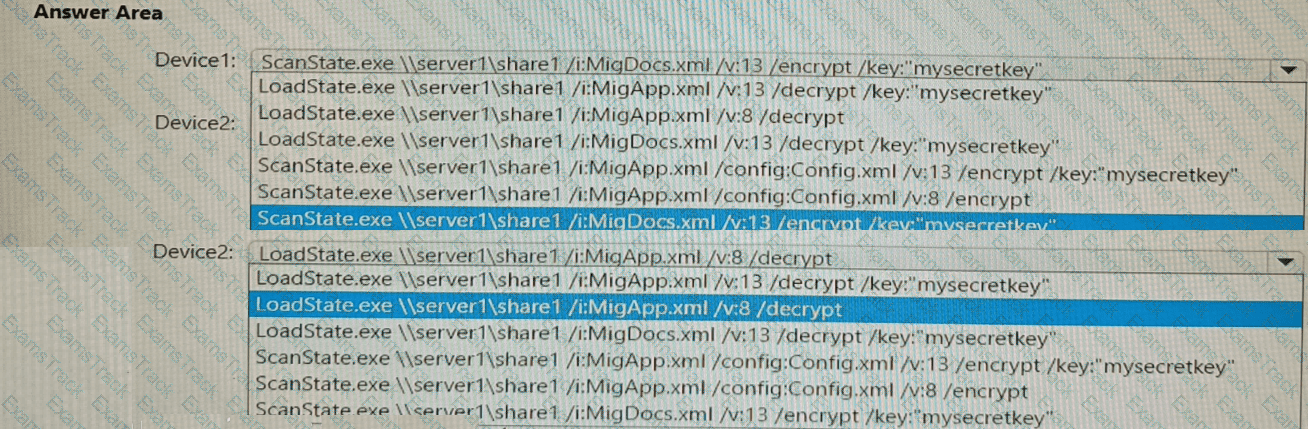
You have the devices shown in the following table.
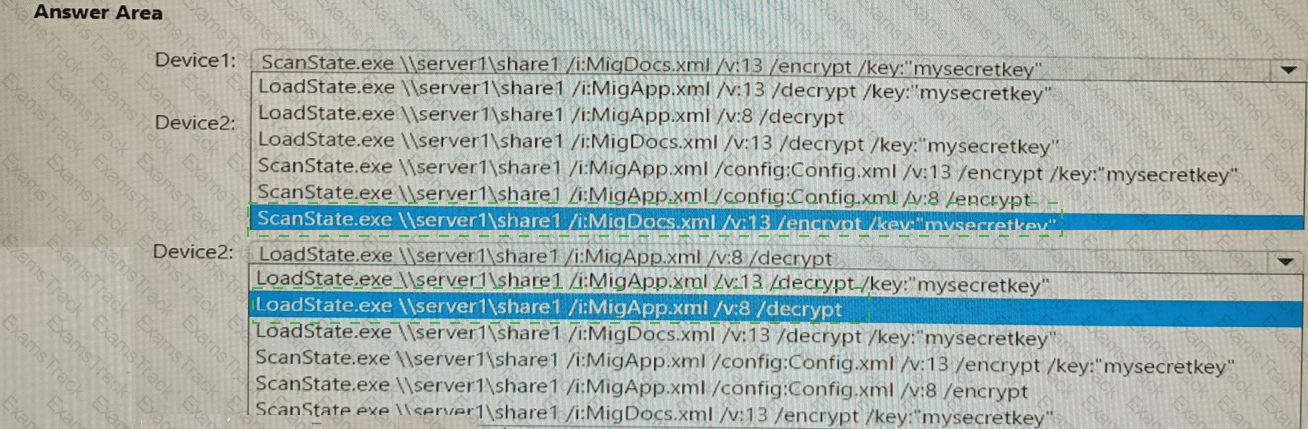
You need to migrate app data from Device1 to Device2. The data must be encrypted and stored on Seryer1 during the migration.
Which command should you run on each device? To answer, select the appropriate options in the answer area.
NOTE: Each correct selection is worth one point.
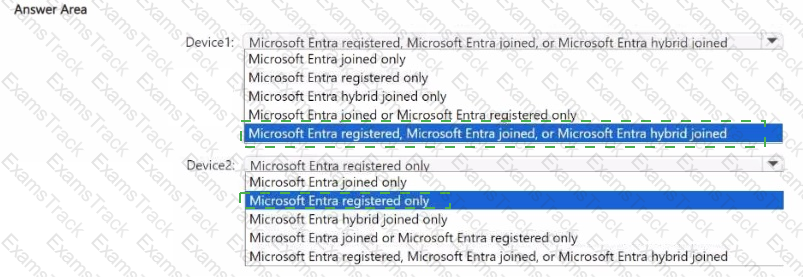
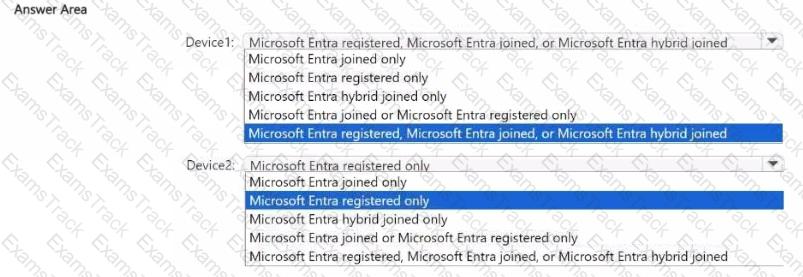
You have a hybrid environment that contains a Microsoft Entra tenant and an on-premises Active Directory Domain Services (AD DS) domain. The environment contains the devices shown in the following table.
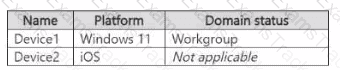
Which Microsoft Entra join type can each device use? To answer, select the appropriate options in the answer area. NOTE: Each correct selection is worth one point.
You have a Microsoft 365 E5 subscription.
You use Microsoft Intune to manage all Windows 11 devices.
You create an attack surface reduction (ASR) policy named Profile1 based on the Attack Surface Reduction Rules profile and assign Profile! to all the devices.
A user reports that an Adobe Reader plug-in is now blocked.
You need to ensure that the plug-in is unblocked.
What should you do?
Note: This section contains one or more sets of questions with the same scenario and problem. Each question presents a unique solution to the problem. You must determine whether the solution meets the stated goals. More than one solution in the set might solve the problem. It is also possible that none of the solutions in the set solve the problem.
After you answer a question in this section, you will NOT be able to return. As a result, these questions do not appear on the Review Screen.
You have a Microsoft Entra tenant named contoso.com.
You purchase an Android device named Device1.
You need to register Device1 in contoso.com.
Solution; You use the Microsoft Authenticator app.
Does this meet the goal?
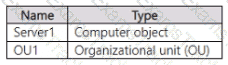
Your on-premises network contains an Active Directory domain named contoso.com. The domain contains a user account named Admin1 and the resources shown in the following table.
You have a Microsoft 365 E5 subscription.
You have a Microsoft Entra tenant that syncs with contoso.com.
Admin! plans to use Windows Autopilot to deploy 10X3 Windows 11 devices. The deployment must meet the following requirements:
• The devices must be Microsoft Entra hybrid joined during the deployment.
• Computer objects must be created in 0U1.
You need to configure Server1 and Active Directory delegation to support the deployment.
How should you configure Server1, and on which resource should you configure delegated permissions? To answer, select the appropriate options in the answer area.
NOTE: Each correct selection is worth one point.

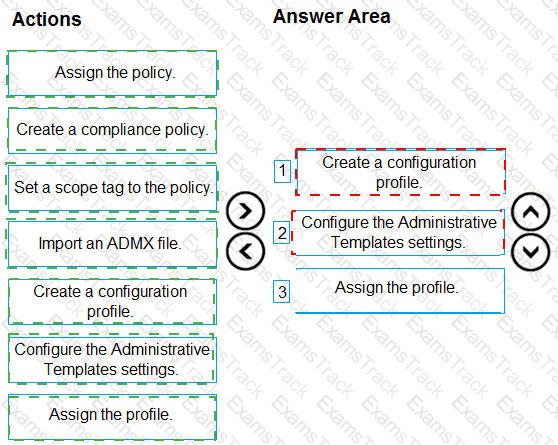
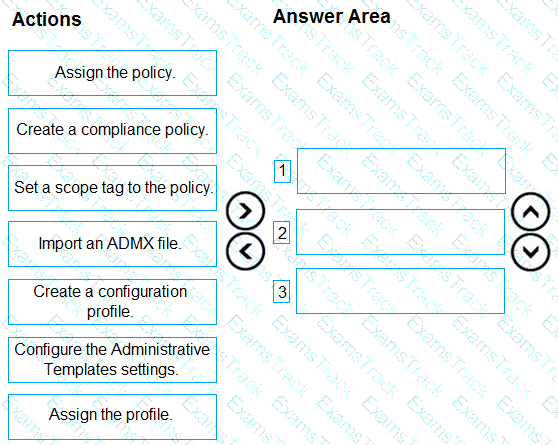
You have an on-premises Active Directory domain that syncs to Azure AD tenant.
The tenant contains computers that run Windows 10. The computers are hybrid Azure AD joined and enrolled in Microsoft Intune.
The Microsoft Office settings on the computers are configured by using a Group Policy Object (GPO).
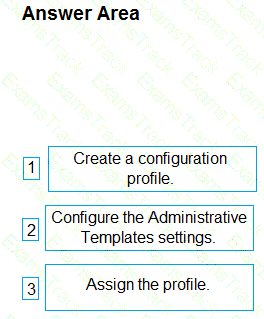
You need to migrate the GPO to Intune.
Which three actions should you perform in sequence? To answer, move the appropriate actions from the list of actions to the answer area and arrange them in the correct order.
Which devices are registered by using the Windows Autopilot deployment service?
Which users can purchase and assign App1?
For each of the following statements, select Yes if the statement is true. Otherwise, select No. NOTE: Each correct selection is worth one point.

|
PDF + Testing Engine
|
|---|
|
$52.5 |
|
Testing Engine
|
|---|
|
$40.5 |
|
PDF (Q&A)
|
|---|
|
$34.5 |
Microsoft Free Exams |
|---|

|

Copyright © 2026 Examstrack. All Rights Reserved

TESTED 06 Oct 2026