New Year Sale 70% Discount Offer - Ends in 0d 00h 00m 00s - Coupon code: 70track

Free Fortinet FCSS_SDW_AR-7.6 Practice Exam with Questions & Answers | Set: 3

Questions 21

Refer to the exhibits.

FCSS_SDW_AR-7.6 Question 21

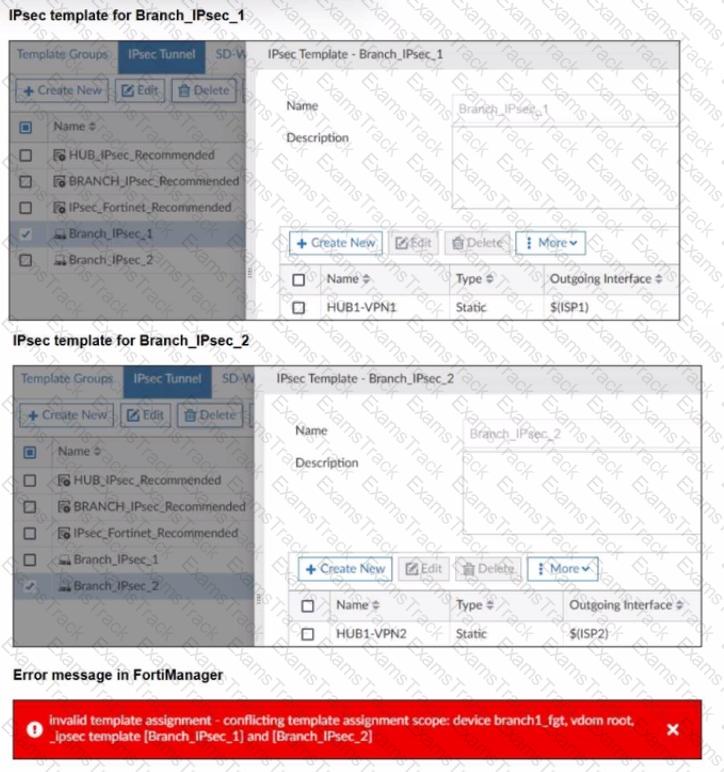
The exhibits show two IPsec templates to define Branch IPsec 1 and Branch_IPsec_2. Each template defines a VPN tunnel. The error message that FortiManager displayed when the administrator tried to assign the second template to the FortiGate device is also shown.

Which statement best describes the cause of the issue?

Options:
A.

You can assign only one template with a tunnel type of static to each FortiGate device.

B.

You can assign only one IPsec template to each FortiGate device.

C.

You should review the branch1_fgt configuration for configured tunnels in the rootVDOM.

D.

You should use the same outgoing interface of both templates.

Fortinet FCSS_SDW_AR-7.6 Premium Access
Questions 22

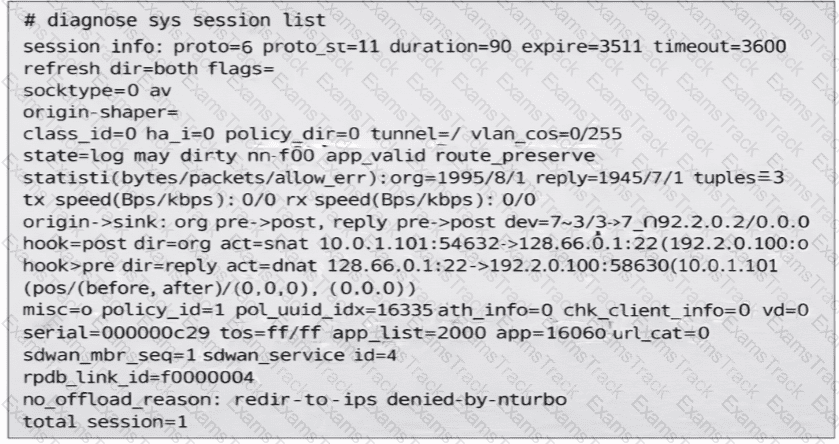
(Refer to the exhibit. You noticed that one SD-WAN member went down and you immediately collected the session output shown in the exhibit. What can you conclude from this output? Choose one answer.)
FCSS_SDW_AR-7.6 Question 22

Options:
A.

FortiGate didn’t receive any traffic related to this session after the interface went down.

B.

FortiGate flushed the gateway for the session.

C.

FortiGate cannot reevaluate the session.

D.

FortiGate already reevaluated this session.

Questions 23

Refer to the exhibits.

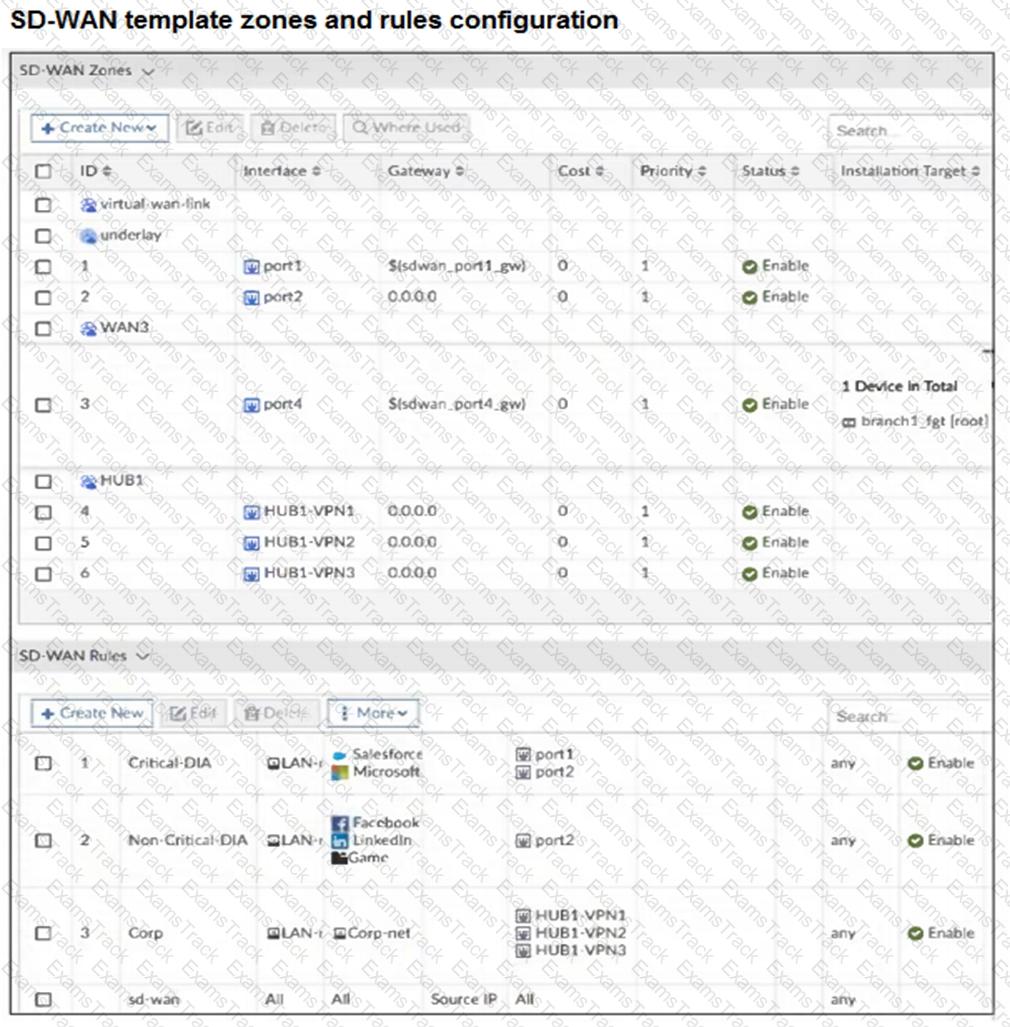
You use FortiManager to configure SD-WAN on three branch devices.
FCSS_SDW_AR-7.6 Question 23

FCSS_SDW_AR-7.6 Question 23

FCSS_SDW_AR-7.6 Question 23

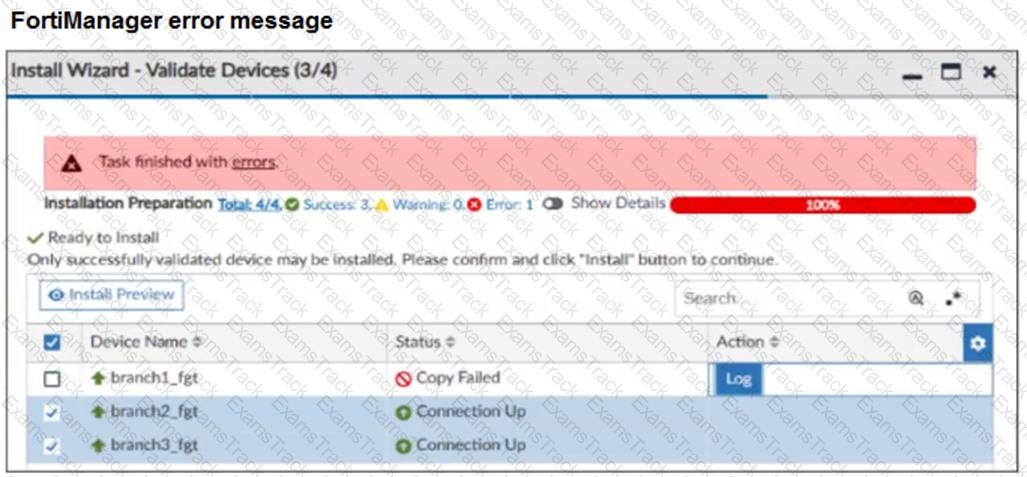
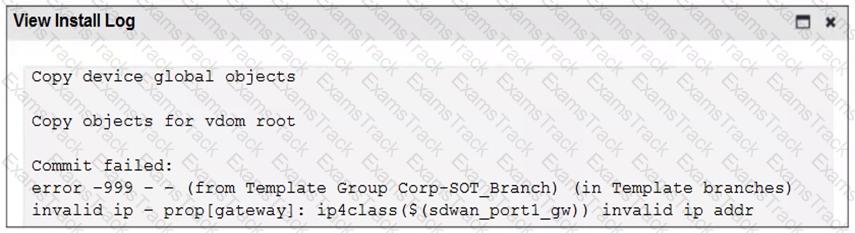
When you install the device settings, FortiManager prompts you with the error “Copy Failed” for the device branch1_fgt. When you click the log button, FortiManager displays the message shown in the exhibit.

There are two different ways to resolve this issue. Based on the exhibits, which methods could you use? (Choose two.)

Options:
A.

Update the management IP address of branch1_fgt.

B.

Specify the gateway of the SD-WAN member port1 with an IP address or use the default value.

C.

Do not define installation targets for SD-WAN members.

D.

Review the per-device mapping configuration for metadata variables

Questions 24

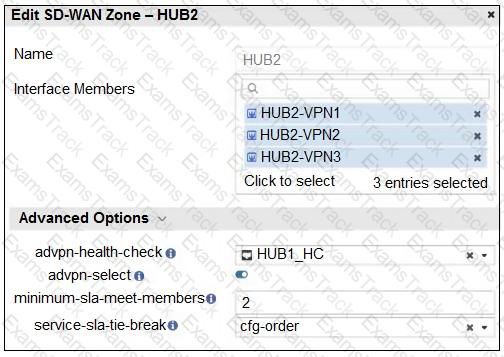
Refer to the exhibit that shows an SD-WAN zone configuration on the FortiManager GUI.
FCSS_SDW_AR-7.6 Question 24

Based on the exhibit, how will the FortiGate device behave after it receives this configuration?

Options:
A.

The configuration instructs FortiGate to choose an ADVPN shortcut based on SD-WAN information.

B.

The configuration instructs FortiGate to allow ADVPN shortcuts for the tunnels of this SD-WAN zone.

C.

The configuration instructs FortiGate to establish shortcuts only when at least two members meet the SLA target.

D.

The configuration instructs FortiGate to establish shortcuts only for overlay interfaces that meet the SLA target HUB1_HC.

Questions 25

Refer to the exhibit.

FCSS_SDW_AR-7.6 Question 25

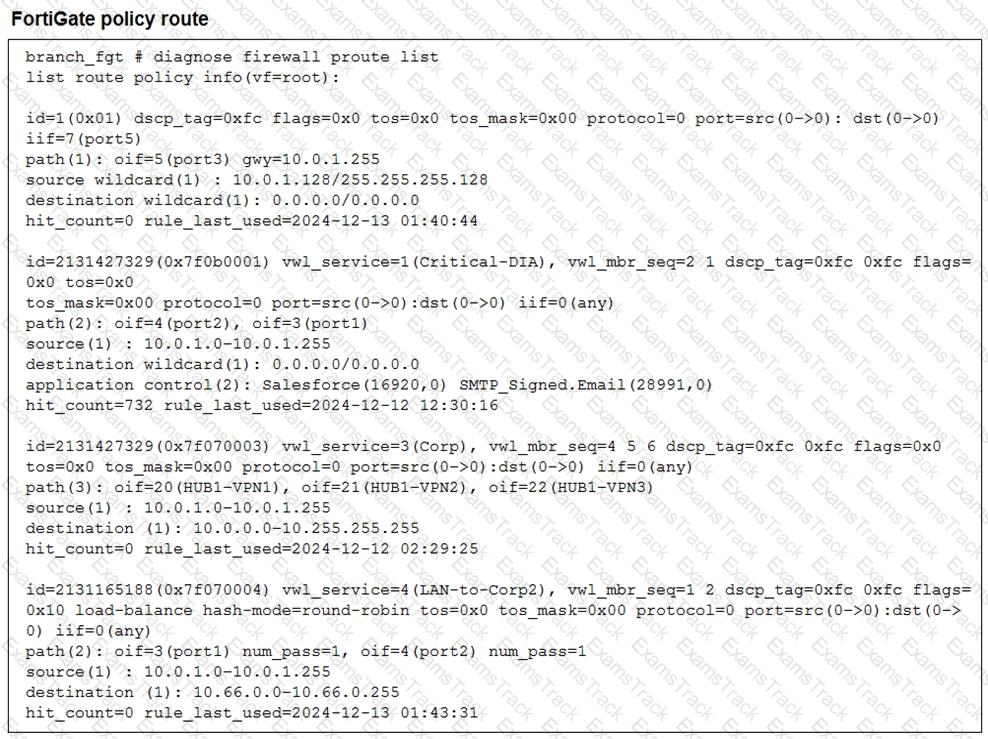
What conclusions can you draw about the traffic received by FortiGate originating from the source LAN device 10.0.1.133 and destined for the company’s SMTP mail server at 10.66.0.125?

Options:
A.

FortiGate steers the traffic from the LAN device 10.0.1.133 to the company SMTP mail server 10.66 0.125 through port3.

B.

ForliGate steers the traffic from the LAN device 10.0.1.133 to the company SMTP mail server 10.66.0.125 through port2.

C.

FortiGate steers the traffic from the LAN device 10.0.1.133 to the company SMTP mail server 10.66.0.125 through the SD-WAN member ID 4.

D.

FortiGate steers the traffic from the LAN device 10.0.1.133 to the SMTP mail server 10.66.0.125 through the SD-WAN member ID 1 or 2.

Questions 26

(You want FortiGate to use SD-WAN rules to steer ping local-out traffic.

Which two constraints should you consider? Choose two answers.)

Options:
A.

You can steer local-out traffic only with SD-WAN rules that use the manual strategy.

B.

By default, FortiGate uses SD-WAN rules only for local-out traffic that corresponds to ping and traceroute.

C.

By default, local-out traffic does not use SD-WAN.

D.

You must configure each local-out feature individually to use SD-WAN.

Questions 27

Within the context of SD-WAN, what does SIA correspond to?

Options:
A.

Remote Breakout

B.

Local Breakout

C.

Software Internet Access

D.

Secure Internet Authorization

Questions 28

Refer to the exhibits.

FCSS_SDW_AR-7.6 Question 28

FCSS_SDW_AR-7.6 Question 28

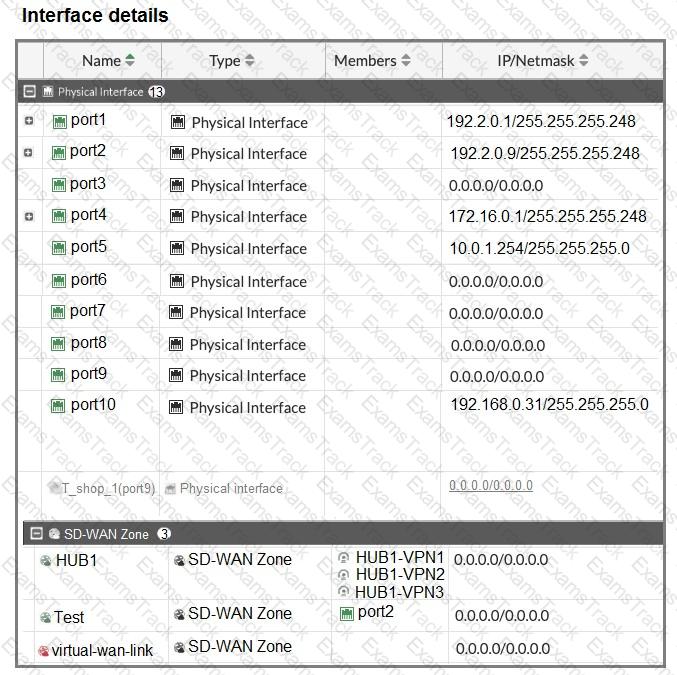
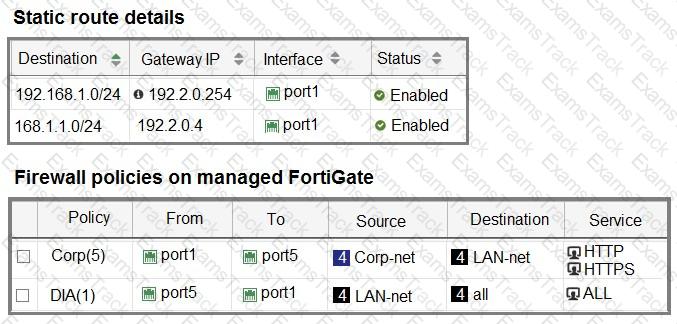
The interface details, static route configuration, and firewall policies on the managed FortiGate device are shown.

You want to configure a new SD-WAN zone, named Underlay, that contains the interfaces port1 and port2.

What must be your first action?

Options:
A.

Define port1 as an SD-WAN member.

B.

Delete the static routes.

C.

Delete the SD-WAN Zone Test.

D.

Delete the firewall policies.

Exam Code: FCSS_SDW_AR-7.6
Certification Provider: Fortinet
Exam Name: FCSS - SD-WAN 7.6 Architect
Last Update: Dec 28, 2025
Questions: 94

Fortinet Free Exams

Fortinet Free Exams
Access free Fortinet exam study guides and practice tests at Examstrack. Ensure your success with top-notch preparation resources at Examstrack.