
Weekend Special Sale 75% Discount Offer - Ends in 0d 00h 00m 00s - Coupon code: sale75best

Free Apple Apple-Device-Support Practice Exam with Questions & Answers | Set: 8

Questions 71

Select two.

What methods can you use to lock notes in the Notes app?

Options:
A.

Custom Notes Password

B.

PIN

C.

Apple ID password

D.

Mac Login Password

E.

Face ID

Apple Apple-Device-Support Premium Access
Questions 72

What allows a Mac with Apple silicon to use apps and other software like plug-ins, add-ons, and extensions that were written for Intel-based Mac computers in macOS?

Options:
A.

Mac Catalyst

B.

Rhapsody

C.

Rosetta 2

D.

Universal Binary

Questions 73

Which Wireless Diagnostics window should you use to see a live view of current Wi-Fi signal strength, quality, and rate?

Options:
A.

Logs

B.

Diagnostics

C.

Performance

D.

Monitor

Questions 74

How can you use AirPlay to share content exclusively with a specific individual from your Apple iPhone and Mac?

Options:
A.

Allow Airplay for anyone in the same network

B.

Allow Airplay for everyone

C.

Allow Airplay for Current use

Questions 75

Match the macOS library resources listed on the left to the descriptions on the right by dragging responses to the correct target areas. Responses may be used once, more than once, or not at all.
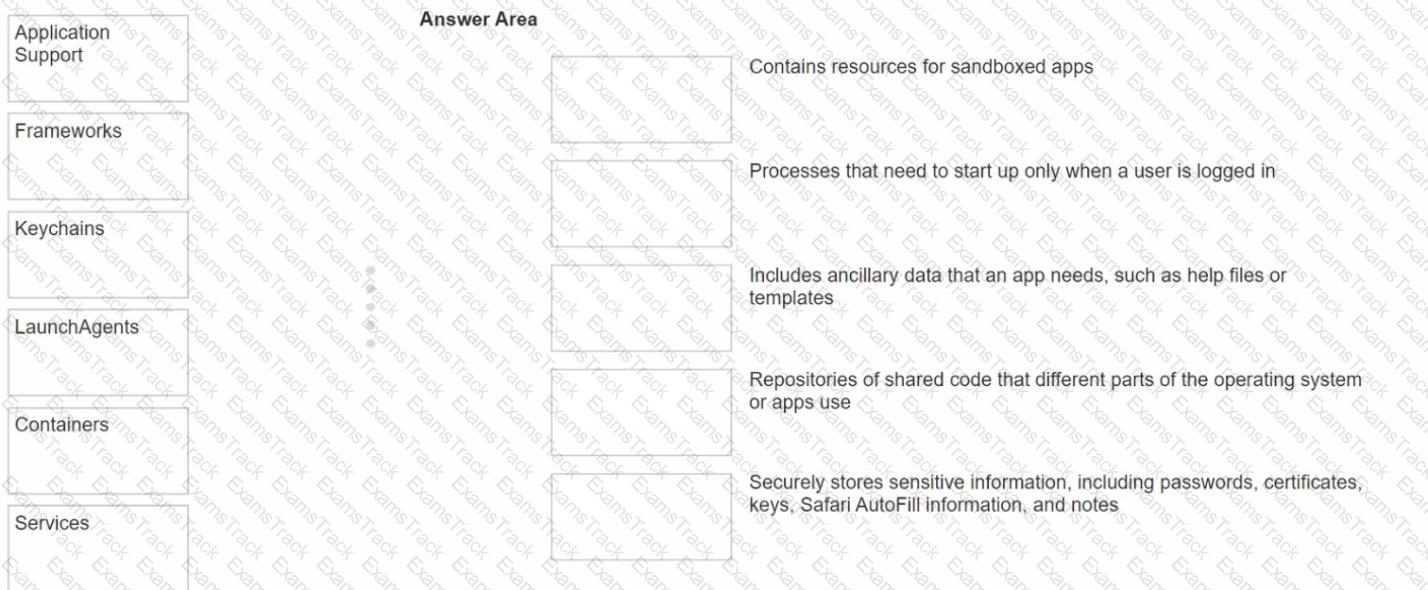
Apple-Device-Support Question 75

Options:
Questions 76

Where can you change the undo send delay setting on your iPad?

Options:
A.

General > Mail > Undo Send Delay

B.

Open your mail app then open settings and select Undo Send Delay.

C.

Settings > Mail > Accounts > Undo Send Delay

D.

Settings > Mail > Undo Send Delay

Questions 77

Use this image to answer the question.

What should you do if you forgot your passcode and your iPhone is disabled?

Options:
A.

Put your iPhone in recovery mode, then connect it to your Mac or PC to restore it.

B.

Force shutdown your iPhone and wait 10 seconds, then turn it back on.

C.

Wait until the Forgot Passcode? message appears, then follow the instructions.

D.

Connect your iPhone to your Mac, then use Apple Configurator to revive the device.

Questions 78

Scenario

Andre created a Keynote presentation on his iPad that he wants to access on the desktop of his MacBook Air.

Select the setting in the sidebar that Andre should turn on to access iCIoud Drive on his Mac.
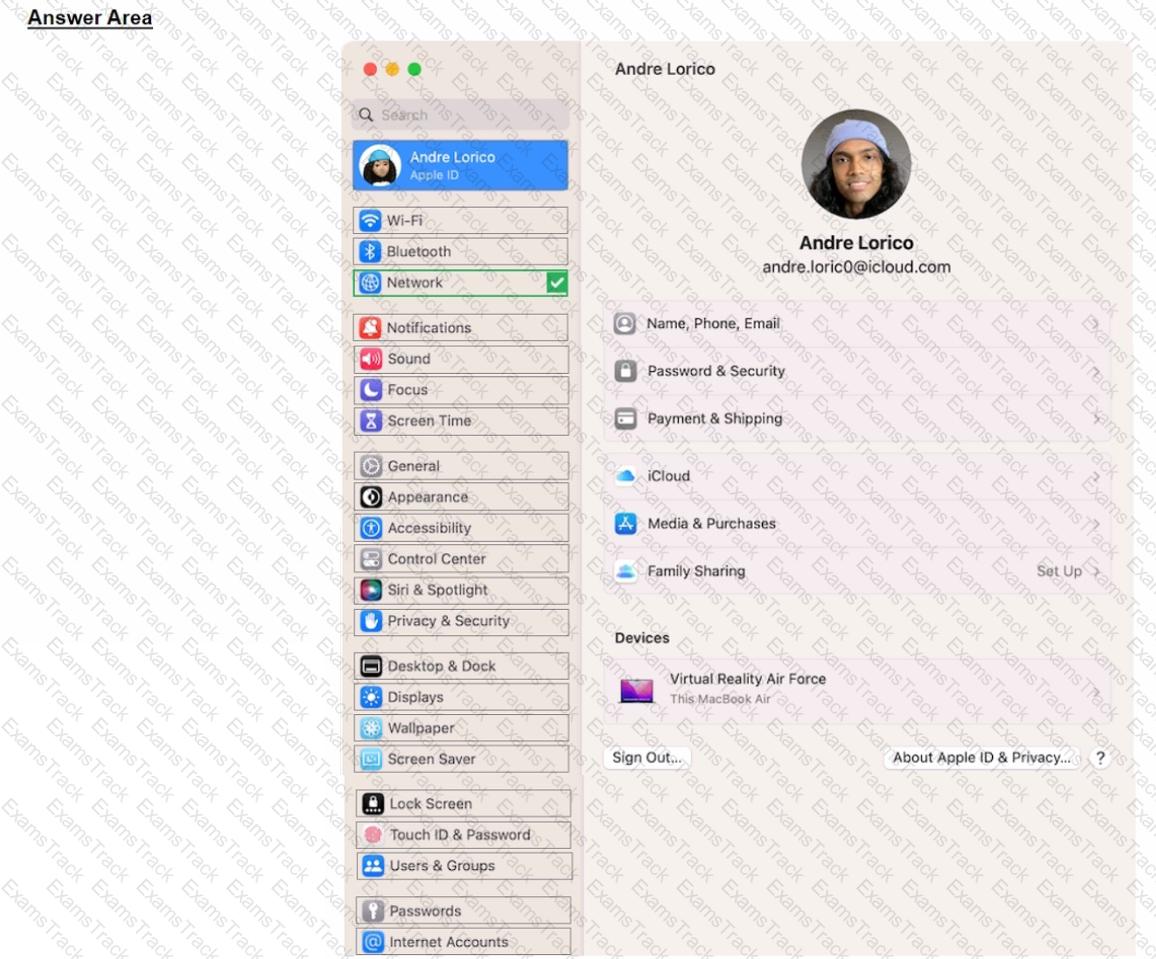
Apple-Device-Support Question 78

Options:
Questions 79

Where should you go in macOS to limit AirPlay Receiver ONLY to devices signed in to your Apple ID?

Options:
A.

Go to System Settings > General > AirDrop & Handoff, then select Current User for the " Allow AirPlay for " option.

B.

Open the AirPlay app from the Utilities folder, then select Current User for the " Allow AirPlay for " option.

C.

Go to System Settings > Privacy & Security, then select Apple ID for the " Allow AirPlay for " option.

D.

Go to System Settings, then select Apple ID for the " Allow AirPlay for " option in the Sharing settings.

Questions 80

How should you force your Mac to reinitialize a peripheral device ' s connection and reload any peripheral-specific drivers?

Options:
A.

Connect the peripheral to a USB hub.

B.

Unplug and reconnect the peripheral.

C.

Unplug other devices on the same bus.

D.

Connect the peripheral to another Mac.