examstrack logo

Which features must all XSLT files contain to be considered valid?
You have an existing Core Connector: Organization (non-IS) integration that sends organization data to an external vendor. The vendor now requires a specific Legacy ID for each organization to be added to the output. A calculated field that generates this Legacy ID already exists in the tenant.
What is the high-level workflow order you would follow to add this calculated field to the output of the integration?
Refer to the following scenario to answer the question below.
A connector is configured to detect changes to government IDs, personal information, and compensation data. The worker history report below shows recent transactions for a new hire.
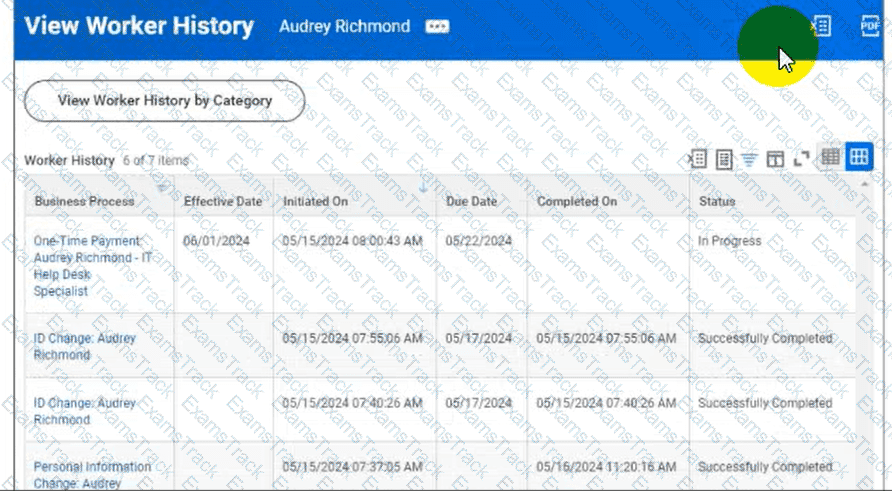

Worker History: Audrey Richmond
The worker history includes a One Time Payment transaction for Audrey Richmond with an effective date of 05/01/2024, initiated on 05/15/2024, due date of 05/17/2024, and status of In Progress. Other transactions shown include ID Change, Personal Information Change, Hire, and Propose Compensation records.
You launch the connector integration to process changes with the following parameters:
As Of Entry Moment: 05/17/2024 12:00:00 AM
Effective Date: 05/17/2024
Last Successful As Of Entry Moment: 05/15/2024 12:00:00 AM
Last Successful Effective Date: 05/15/2024
Why will the integration output file exclude the one-time payment change?
Refer to the following scenario to answer the question below.
You are configuring a Core Connector: Worker integration to send data to a new external compliance and certification tracking vendor. You have begun to configure the connector with the Data Initialization Service (DIS) enabled. Your goal is to extract worker qualification data, but the vendor has three specific requirements:
The file must only include Active workers who are in the “Clinical Staff” Job Family.
The vendor has specified that for each worker’s Education data, they only want to receive the Institution Name, Institution Type and Degree.
The vendor requires a custom “License ID” that must combine the Certification Name and Issuing State, for example, “RN-CA”. A Calculated Field that provides this custom “License ID” already exists in the tenant.
During testing, using a Full File run, the output file is missing all education-related information, even though you believe you have initially configured field attributes such as Institution Name, Institution Type and Degree in the Configure Integration Field Attributes step. Additionally, you confirmed that the Worker Qualification Data Section is marked as Include in Output.
What should you do to resolve this issue?
You are developing a Core Connector: Worker integration with DIS enabled. You configure the Population Eligibility to include all US workers and also define the Eligibility Criterion field to return only those workers assigned to the Sales organization.
When you run the integration, the output includes all US workers instead of just those in Sales.
What should you do to ensure only workers in the Sales organization appear in the output?
Which three features must all XSLT files contain to be considered valid?
When creating an ISU, what should you do to ensure the user only authenticates via web services?
You have successfully configured an ISU and an ISSG with the correct security policies and have assigned them to an EIB.
What task do you need to run before you can launch the EIB?
The following XML code was generated through a RaaS that will be used in an EIB.
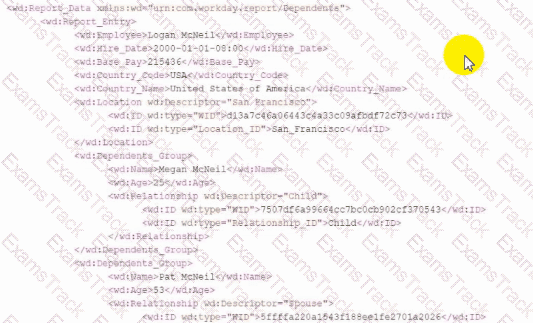
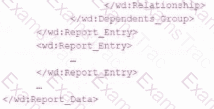
Within a template that matches on wd:Report_Entry, what XPath expression do you use to select the value of the Relationship_ID element?
Refer to the scenario. You are configuring a Core Connector: Worker integration with the Data Initialization Service (DIS) enabled. The integration must extract worker contact details and job information, including a calculated field override that determines phone allowance eligibility.
When testing, you run the Test Security Related Action from the Configure Integration Field Override step. Several field overrides display “No” in the Available by User column.
To ensure the ISSG has access to these field overrides and that “Yes” is displayed in the Test Security step, what configuration should you review?
|
PDF + Testing Engine
|
|---|
|
$49.5 |
|
Testing Engine
|
|---|
|
$37.5 |
|
PDF (Q&A)
|
|---|
|
$31.5 |
Workday Free Exams |
|---|

|

Copyright © 2026 Examstrack. All Rights Reserved

TESTED 05 Oct 2026
