examstrack logo

You need to create a report that includes data from multiple business objects. For a supervisory organization specified at run time, the report must output one row per worker, their active benefit plans, and the names and ages of all related dependents. The Worker business object contains the Employee, Benefit Plans, and Dependents fields. The Dependent business object contains the employee ' s dependent ' s Name and Age fields.
How would you select the primary business object (PBO) and related business objects (RBO) for the report?
Refer to the scenario. You are configuring a Core Connector: Worker integration with the Data Initialization Service (DIS) enabled that runs once daily. The integration must extract only active worker records with changes to compensation, home address, or business title since the last run 24 hours ago, using Workday’s change detection to avoid full extracts.
During testing, an employee’s home address is updated, but the integration does not detect the change in the output. The employee is eligible, the connector uses the correct integration field attributes, and the launch parameters are properly configured for a Full-Diff extract.
What configuration task must you modify from the integration system to ensure the expected change is included in the output?
Refer to the scenario. You are configuring a Core Connector: Worker integration with the Data Initialization Service (DIS) enabled to extract worker demographic and contact information. The integration must include worker fields such as name, address, and a calculated field identifying workers eligible for a phone allowance.
The Phone Allowance Type calculated field exists and is functional in the tenant, but it is not displaying in the output.
What configuration step should you complete to include this field in the output?
An external system needs a file containing data for recent compensation changes. They would like to receive a file routinely at 5 PM eastern standard time, excluding weekends. The file should show compensation changes since the last integration run.
What is the recurrence type of the integration schedule?
The following XML code was generated using Core Connector: Location.
You need to produce a fixed length file to enforce a 25-character length for the locc:Location_Name, padded with * on the left if shorter, and issue a warning if it exceeds this length.
What combination of XSLT attributes and values do you use?
The following XML code was generated using Core Connector: Location.
You need to validate that both the locc:Location_Name and locc:Municipality elements are not empty, and provide custom error messages with a severity level for each.
Which XSLT attributes and values should you use when producing a pipe-delimited file?
What are the two valid data source options for an Outbound EIB?
Refer to the following scenario to answer the question below.
You have been asked to build an integration using the Core Connector: Worker template and should leverage the Data Initialization Service (DIS). The integration will be used to export a full file (no change detection) for employees only and will include personal data. The vendor receiving the file requires marital status values to be sent using a list of codes that they have provided instead of the text values that Workday uses internally and if a text value in Workday does not align with the vendors list of codes the integration should report " OTHER " .
What configuration is required to output the list of codes required from by the vendor instead of Workday ' s values in this integration?
How many integration systems can an ISU be assigned to concurrently?
Refer to the following scenario to answer the question below.
A connector is configured to detect changes to government IDs, personal information, and compensation data. The worker history report below shows recent transactions for a new hire.
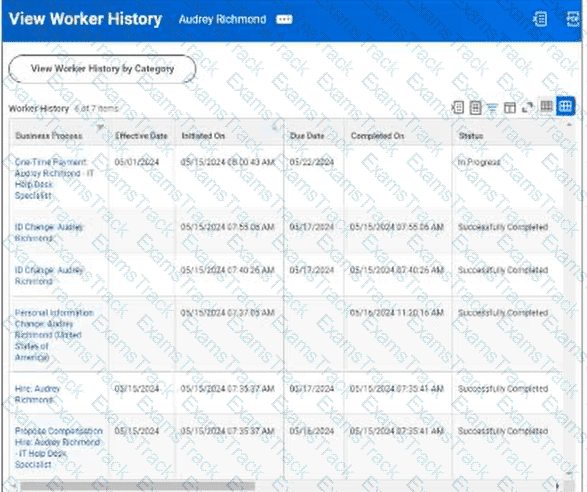
Worker History: Audrey Richmond
The worker history includes a One Time Payment transaction for Audrey Richmond with an effective date of 05/01/2024, initiated on 05/15/2024, due date of 05/17/2024, and status of In Progress. Other transactions shown include ID Change, Personal Information Change, Hire, and Propose Compensation records.
You launch the connector integration to process changes with the following parameters:
As Of Entry Moment: 05/17/2024 12:00:00 AM
Effective Date: 05/17/2024
Last Successful As Of Entry Moment: 05/15/2024 12:00:00 AM
Last Successful Effective Date: 05/15/2024
Why will the integration output file exclude the one-time payment change?
|
PDF + Testing Engine
|
|---|
|
$49.5 |
|
Testing Engine
|
|---|
|
$37.5 |
|
PDF (Q&A)
|
|---|
|
$31.5 |
Workday Free Exams |
|---|

|

Copyright © 2026 Examstrack. All Rights Reserved

TESTED 05 Oct 2026
