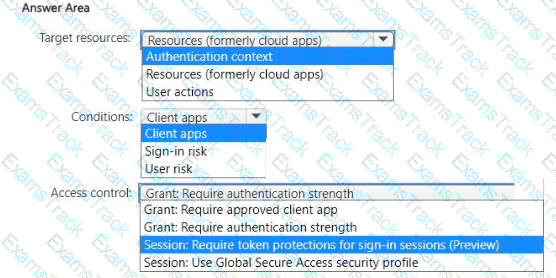
Which users can create Pool4, and which users can join session hosts to the domain? To answer, select the appropriate options in the answer area.
NOTE: Each correct selection is worth one point.

Note: This question is part of a series of questions that present the same scenario. Each question in
the series contains a unique solution that might meet the stated goals. Some question sets might have more than one correct solution, while others might not have a correct solution.
After you answer a question in this section, you will NOT be able to return to it. As a result, these
questions will not appear in the review screen.
You have a Windows Virtual Desktop host pool that contains five session hosts. The session hosts run
Windows 10 Enterprise multi-session.
You need to prevent users from accessing the internet from Windows Virtual Desktop sessions. The session hosts must be allowed to access all the required Microsoft services.
Solution: You configure the Address space settings of the virtual network that contains the session hosts.
Does that meet the goal?
You have an Azure Virtual Desktop host pool.
You add a French language pack to each session host in the host pool.
Several days later, users report that English displays when they connect to Azure Virtual Desktop.
After an investigation, you discover that the French language pack was removed, and the session hosts reverted to English.
You need to ensure that the French language pack is always available on the session hosts.
What should you do?
Which setting should you modify for VNET4 before you can deploy Pool4?
You create the virtual machines shown in the following table.

You need a source virtual hard disk for new Azure Virtual Desktop session host deployments. The source operating system must have user-specific and machine- specific information removed.
Which virtual machines can you use as the source?
You are designing an Azure Virtual Desktop deployment.
You identify the network latency between the locations where users reside and the planned deployment.
What should you use to identify the best Azure region to deploy the host pool?
Note: This question is part of a series of questions that present the same scenario. Each question in the series contains a unique solution that might meet the stated goals. Some question sets might have more than one correct solution, while others might not have a correct solution.
After you answer a question in this section, you will NOT be able to return to it. As a result, these questions will not appear in the review screen.
You have the following:
A Microsoft 365 E5 tenant
An on-premises Active Directory domain
A hybrid Azure Active Directory (Azure AD) tenant
An Azure Active Directory Domain Services (Azure AD DS) managed domain
An Azure Virtual Desktop deployment
The Azure Virtual Desktop deployment contains personal desktops that are hybrid joined to the on-premises domain and enrolled in Microsoft Intune.
You need to configure the security settings for the Microsoft Edge browsers on the personal desktops.
Solution: You configure a Group Policy Object (GPO) in the Azure AD DS managed domain.
Does this meet the goal?
You have an Azure Virtual Desktop deployment that contains a session host named Host1.
You need to configure Windows Defender Firewall to allow inbound network traffic for RDP Shortpath on Host1.
Which program in the C:\Windows\System32 folder should you specify in the inbound firewall rule?
You have an Azure Virtual Desktop host pool named Pool1. Pool1 contains session hosts that run Windows 11 Enterprise multi-session.
You need to use Performance Monitor to troubleshoot a poor frame quality issue that is affecting a current user session to Pool1.
Which performance counter should you use?
Which three PowerShell modules should you install on Server1 to meet the technical requirements? Each correct answer presents part of the solution.
NOTE: Each correct selection is worth one point.
|
PDF + Testing Engine
|
|---|
|
$52.5 |
|
Testing Engine
|
|---|
|
$40.5 |
|
PDF (Q&A)
|
|---|
|
$34.5 |
Microsoft Free Exams |
|---|
|