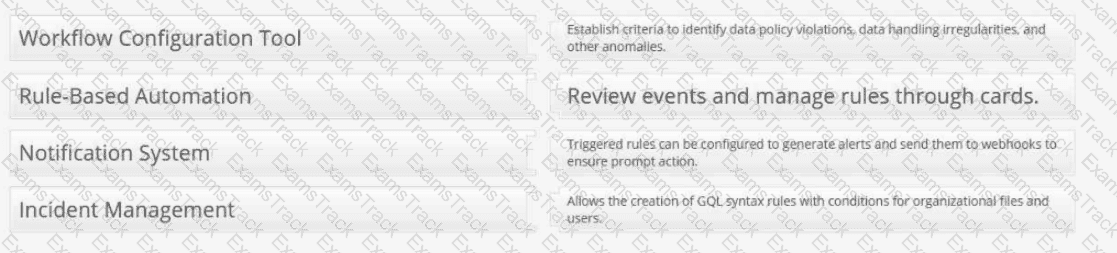
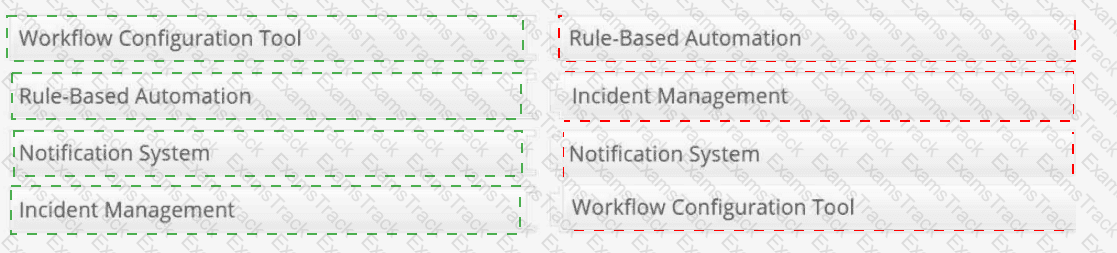
Workflow Configuration Tool → Allows the creation of GQL syntax rules with conditions for organizational files and users.
Rule-Based Automation → Establish criteria to identify data policy violations, data handling irregularities, and other anomalies.
Notification System → Triggered rules can be configured to generate alerts and send them to webhooks to ensure prompt action.
Incident Management → Review events and manage rules through cards.
Controls Orchestration in Forcepoint DSPM is the policy automation layer used to convert data-risk criteria into reviewable operational events. The Workflow Configuration Tool is represented by the rule-building interface under Policy Center > Controls Orchestration , where administrators define datasets, ownership, rule conditions, and GQL logic for organizational files, trustees, or agent activities. Forcepoint states that rules are created to identify data matching specific criteria and are applied during scans of the selected dataset.
Rule-Based Automation describes the criteria-driven detection model. Administrators establish rules that identify policy violations, data-handling irregularities, or other anomalies that require attention. Notification System maps to the ability to configure triggered rules to send external notifications, including webhook-based alerts, when matching data is detected. Incident Management maps to the Incidents workflow: Forcepoint states that each rule is automatically added as a card in the Incidents tab, and selecting the card takes the user back to the associated rule. References/topics: Policy Center, Controls Orchestration, GQL Conditions, Notifications, Webhooks, Incidents .